Saturday, 11 June 2016
Criteria C - Learning French Website for Year 7
This is my website link to my IDU French Website, "Fluent French":
http://muskandabur2020.wix.com/fluentfrench

Wednesday, 8 June 2016
Website reflections - Process of creating my site - Criteria C
Week 1:
As, I was not able to attend lessons, I was unable to understand the concept of dreamweaver, and the task to create our own website. At first I found it very difficult to make my own site, so I decided to browse around other sites at first. In the first week I spent time researching and exploring different websites, to get a good idea on how to carefully structure and layout my website. In the different websites I saw I noticed that the ones with brighter colors and more pictures grabbed my attention, and the ones with no pictures and less colors seem to look very dull and boring. So, I decided to choose bright colors like orange, blue, green and yellow, and to make the site more happy rather than dull I decided to keep the background white, so the colors could stand out. At first I started laying out the different pages that I had and add the necessary colors. I would then later on add the pictures related to the information I choose. At first I explored different features in "Wix", I tried to use as many features I could to show a higher level of understanding and skills for using this online website making site called "Wix". It especially helped to use the "Help" button in Wix, as whenever I was stuck or was unsure what to do, I clicked this button and it guided me to the features I required. When creating my site I kept in mind that it should be easy to use and user friendly.
Week 2:
In the second week I started to build my site further, I started to plan out what all I am going to be writing, and so I made an about page which talked about all the things that will be on the site. I started to add pictures which were relevant and appropriate, this made my website look eye catching and overall looked really nice. I was really happy with how it was turning out, I started to add hyperlinks, and they were successful all my hyperlinks work. After creating the about page I went back to my home page to add audios and more visuals. I also planned to put a youtube video for learning basic phrases on the home page. I was able to complete these pages in a few days and next I moved on to my approach page I had come across some research which I had found interesting so I thought to add that in, along with fun facts about speaking French. I also talked about all the different activities that will be on the site for the users and readers to do to learn French. After research and looking at many different language teaching sites I wanted to make my site look more professional and similar to the sites available online, so I created a register page, this page had contact details about the site things like location, email and phone number. I also made a box for any suggestions or questions that users or readers had. Much like many other sites that I have seen I have also made a suggestion and questions box. When creating the site some change were made from my original idea, as the theme that I originally wanted to choose was a little dark and adultish.
After exploring different sites I had a clear understanding that my site should be bright and colorful, as my target audience is younger than me and will be attracted to these bright and lively colors. I have tried to make my site look like a kid site, for doing so I have picked out kid pictures, and animated pictures, that explain the information in a fun way. The aim of my site is to keep my target audience engaged so that they don't get bored and leave. To do this I made a checklist of a few things I wanted on the site. I wanted to have at least one picture one each page, I wanted videos that had good visuals, and I wanted to good audios. I am happy that I was successfully able to do all of these things. My website started coming together, now I had to add the lessons and quizzes page.
Week 3:
In week 3 I started making a list of things I wanted in my lessons and quizzes page. I planned the layout to make sure it looked nice and looked organized. I did not want to fill the page with information making it looked cluttered, as I have seen a few sites like this and personally I think they do not look nice at all. It makes it hard to read and the user or reader does not feel the need waste time on the site, and will eventually leave. So, I made sure my information was evenly spaced out and organized well so the presentation looks neat and readable to the reader or user. For my lessons I clearly labelled all the topics so that the would be segregated and it would be easy to identify the different topics for the user or reader. I have made the title of the topics bold and clear and written it in white capital letters on a horizontal yellow strip, which highlights the title even more. The topics I had chosen to use in my website were: greetings and courtesies, common fruits, basic colors, French alphabets A - Z and numbers 1 - 100. The topics greetings and courtesies, common fruits, and basic colors are clearly labelled with their English and French name, including an audio, to learn how to say the word correctly. I think it is important to have audios, so the user or reader can learn how to correctly say the word, and learn how to pronounce it. The common fruits and basic colors also have respective pictures for greater understanding, making it easier to learn the words. For the French alphabets A - Z and numbers 1 - 100 I decided to put 2 youtube videos with good visuals to learn this as this does not require much explaining, and can be learnt by watching the video a couple of times.
After I finished my lessons I moved on to my quizzes. On the top of the page I decided to write a motivational sentence, to get the user or reader excited for attempting the challenge. The sentence I wrote was "Are you up for a French quiz? Let's do it!", and under this I decided to make 3 different quizzes which tested different skills and knowledge of the topics on the site. For the first quiz I created a word search, where you have to find basic phrases, the phrases were written in a column right next to the word search. In the second quiz there is a English word and you have to choose from he 4 choices, the right answer in French. This quiz has a timer, so this will test how quickly the reader or user can complete the quiz. The last quiz is about numbers, similar to the second one, the number will be written in English and you have to choose the correct number in French from the 4 choices. After I completed my website I went over each page and tested all the buttons to make sure they were working, and checked hyperlinks to see if they were leading to the right page. After I was fully satisfied with my website I published it.
I really enjoyed this project as it was interactive between French and IT. I haven't done a project liked this before and it was fun to work on the 2 subjects. I enjoyed mixing mediums from both subjects. I would have wished to have more time for this project, to experiment on more things and add more mediums to my site to make it more interactive and full of content. It was hard to manage time to work on this project, as I had to work on assessments on other topics. Next time, if I get more time I would specifically like to work on my lessons, as I feel I could have added many more things for the users and readers to learn. Overall I liked this project and hope that we get to do this with a different subject next time.


Screenshots of my website
Home Page:


About Page:


Approach Page:

Lessons Page:


Quizzes Page:


Register Page:

Reflection on French Website Design - Criteria B and Criteria D
Introduction:
This term we looked at creating our own website using an online website creating tool called "Wix". This website should be targeted towards year 7 students, and should be made to help them learn French. In the beginning we started by exploring different websites which carried out different themes. Some seemed appropriate for the task and some seemed a little confusing. Looking at those websites I gained great understanding of the importance of layout. It is extremely important how you layout things, so that your website is easily accessible and user friendly. It is also important to choose the right theme which is appropriate and suitable for the target audience, which in this case is year 7 students. This means the website should be attractive and eye catching, this can be done using bright colors, fun fonts, and loads of pictures that are relevant to the topics/lessons being taught. This way the children will enjoy learning and won't get bored easily.
In Wix there are many different features that can be used to create a great site. Wix enables you to have different backgrounds, upload audios and videos, place pictures in many different layouts, use different fonts, choose over many bright and dark colors, and other various tools. When I started using Wix in the beginning it seemed a bit hard, but later on I seem to find everything well organized and easy to learn. When building my website I often clicked the "Help" button which helped me navigate through various different things in order to build my website, and to make it better. When building the website on Wix I kept in my all the important key features that the website should have so that it is easily accessible for all users and should be eye catching. In order to do this I made sure that all my texts are illustrated with pictures to help the learner/reader understand more clearly. For example when writing a family member's name in French, it would be good to have a picture next to it, this will increase and speed up the learning process.
- What is the purpose of the web page/site?
- Who is your target audience?
- What will bring your audience back?
- Where will your audience be using the site?
My target audience is year 7 students. so, keeping this in mind I need to make my website presentable in a way that attracts them, and they are willing to learn.
I think to bring my audience back I will have to have certain features on my site. First of all the website should be visually attractive. Secondly, it should be easy to navigate/user friendly. Thirdly, the content should be presented in a way that it looks eye catching and fun to read. For example it would be a good idea to have pictures with text to have a greater understanding of the topic/lesson and also to enjoy it. The content itself is also important, the different forms that you use to present the data also matters. For example to have a video for the French numbers, this is appropriate as this does not require much explaining.
My audience will be using this website in their day to day lives and in classes. They will use the website to learn more about French, so that later on they can have a better understanding in classes, and they can also use French when the travel to France.
Home Page:
Before creating my website I explored websites that were already made for foreign languages this gave me a basic idea of how I should construct my website. I specifically liked the site "Duolingo" where you can learn many different foreign languages for free. The website looked eye catching and had all the relevant and necessary information needed. Although, I decided to make my website much more different that that. I planned to use bright colors on my site, and separated each part to easily access and use the website. I decided to call my website "Fluent French". On my home page on the top left corner in I have written "Fluent French for 7th graders" in the font 'Patrick Hand' as this font looked nice, and I made this a bright orange color, which made it look eye catching. Right under this I have written A (a) B (be) C (se) in the brackets are the sounds that each Alphabet next to it has. On the top right corner I decided to write a quote for learning. I did some research and found this quote "You can never understand one language until you understand at least two". This quote is by Geoffrey Willans. Then under the two titles I have my menu which consists of 6 different pages. One is the home page, second is the about page, third is the approach page, fourth is the lessons page, fifth is the quizzes page and sixth is the register page. Under this I have a Slideshow of three pictures, each picture is of a child learning happily in safe and comfortable environment.
Next to the slideshow I have tried to make my website similar to other websites where they advertise different things. I have mentioned "Speak French in 30 days Daily only 30 minutes". This makes my website look more professional and similar to other websites online. Under this I have put a nice video to learn basic phrases. Such as: how to say your name, how to say hello, how are you, I'm fine, thank you, what is your name, how old are you, where are you from, what do you do, I am a student, where do you live, I live in Paris (can be changed to wherever you are from), do you have any brothers or sisters, what do you like to do, it was a pleasure meeting you see you soon, and goodbye. The video can be easily watched, it is a youtube video and will start as soon as you click the play button. Next to this I have a few basic phrases audios with respective pictures. I have 6 audios and pictures of the phrases write, group, friend, color, smile and draw. Overall my home page is made on a white background, with colorful pictures, so that pictures stand out and look eye catching.
About Page:
In my about page I have explained what all we are trying to achieve when teaching the students. Throughout some research I have discovered that learning a language at a younger age is more beneficial as the child's brain has the capacity to learn more and at a much faster rate. Through research I have found out the younger the learner, the better they are at mimicking new sounds and adopting pronunciation. The brain is open to new sounds and patterns in preadolescence. After age 10, learning new words becomes progressively harder until, as adults, it is exceedingly difficult. The older you get, the more you use your native language and the more it comes to dominate your linguistic map. You still have brain plasticity, but your mother tongue rules. Your brain trains itself to not pay attention to foreign sounds, and the space in your head dedicated to language gets rather crowded. So, after going through my research I planned to mention this on my site, and state that it is easier for younger people to learn a new foreign language, this way they will be educated. Bilingualism carries many benefits. Research shows that bilinguals, especially those who have learned a second language, demonstrate superior reading and writing skills. On my website "Fluent French" children will be able to learn this new language very easily with my website, as it is a platform where great amount of information and pictures are available.
In the about page I have mentioned the different ways that I will be portraying the information to learn French. Their are videos, quizzes, Lessons, Songs and Flashcards to keep kids entertained while inspiring them for a never-ending love of learning a foreign language. I have carefully laid out my information. The structure is organized well and the information isn't written in long texts. They are short easy to read paragraphs which are quick and to the point. This keeps the user/reader entertained and engaged so that they don't leave the site. Next to my information on the right I have a picture of a girl studying. It is important to have pictures, as a plain text seems too boring and non engaging. Next to the picture there is a column in which their are quick fun facts. This layout is especially good because the reader/user can see all the information nicely organized in one place, and they can view this whole piece of information without scrolling. When you scroll down from the information you will find another picture. This picture is a picture of children. Having many pictures of children indicates this is a very child friendly site. I have tried to make it a nice, safe, child friendly environment so that kids want to learn on this website. Below the picture there is brief information about how the site teaches French to children in a fun environment, with the use of songs, interactive videos and quizzes to test their skills. Next to this I have given brief information on the building blocks of foreign language. Here I have send that you only need 500 words to be considered “conversational” in a language. With Fluent French’s method, a child can learn over 360 words and phrases, providing the essential building blocks for language learning. Overall my about page is made on a white background with eye catching colors for the text and has relevant pictures included.
Approach Page:
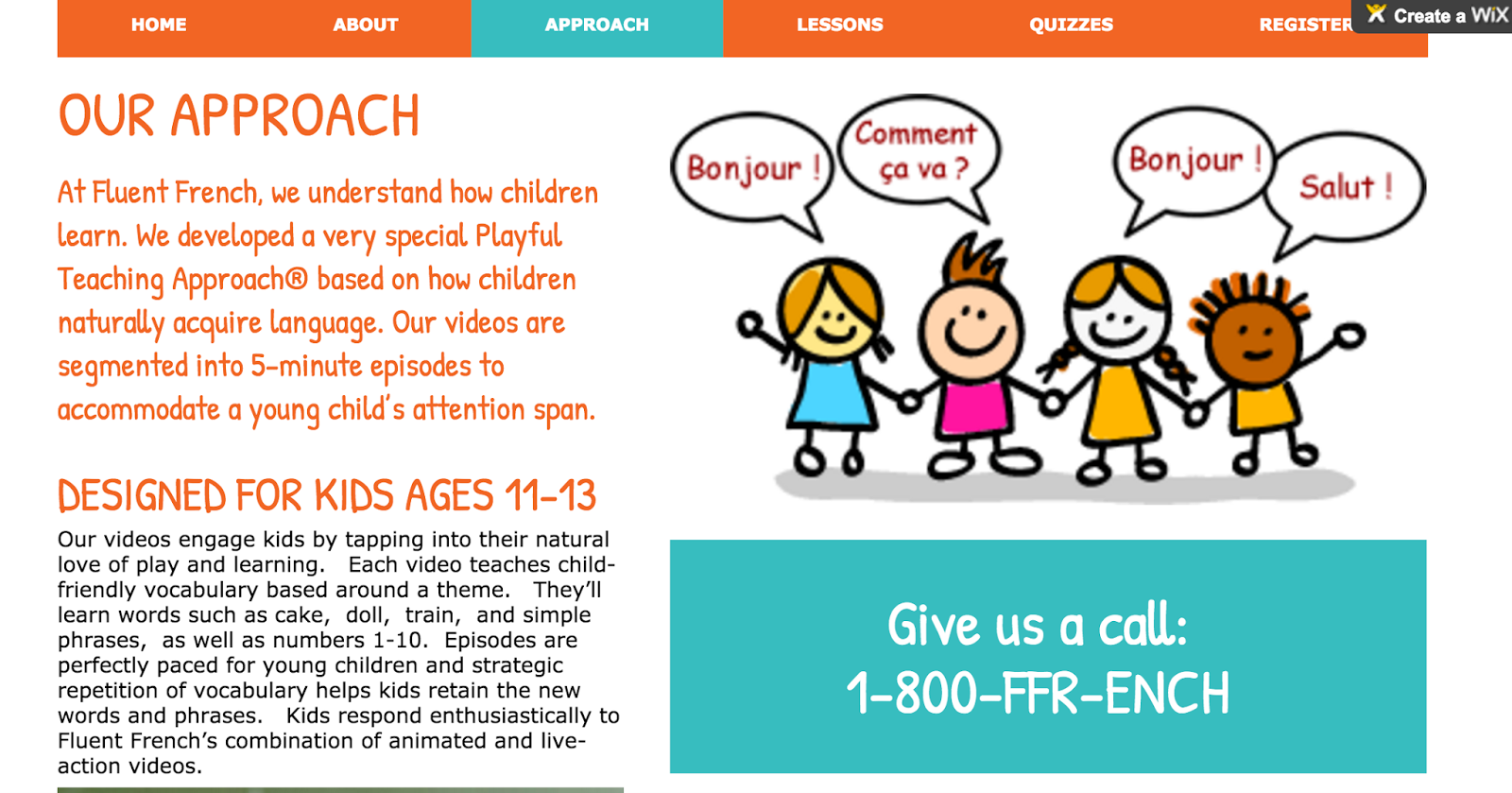
In my Approach page I am talking about the different techniques that will be used to teach the children French, and how these techniques are successful and beneficial. Since, children like to play I have made fun quizzes which will enable children to learn faster while enjoying. There are videos segmented into 5-minute episodes to accommodate a young child’s attention span. Each video teaches child-friendly vocabulary based around a theme. They’ll learn simple phrases and numbers through these videos. Episodes are perfectly paced for young children and strategic repetition of vocabulary helps kids retain the new words and phrases. By doing this children will start to learn the language structure much more easily. Children will be very happy to learn through animated and live action videos. Next to this I have a cartoon picture of 4 children holding hands, where each one is saying something in French. Like many websites have phone numbers to contact, I have also put one to make the website more like any other professional language learning website. Although, I have not given a real number but instead this: 1-800-FFR-ENCH. Throughout research I have found out that learning another language improves memory and analytic abilities and strengthens problem solving skills. Then I have mentioned some fun activities that will be on the site, such as Quizzes, Songs, Fun stories, Word Guessing Games, and Flash Cards.
In the Approach page I have explained how each child can immerse themselves in a new learning experience that will help the learn a new language or to get better at it. No language is easy to learn, but also not impossible. In Fluent French they key is to spend time learning everyday for short periods, this gives repetition and builds in the memory, soon you will not forgot what you have learnt. It is also important to obtain the knowledge, as well as you can. It is hard to watch an hour long video with lots and lots of detains on speaking French. But it is much easier to watch many short (5 min long) videos, that each explain a different topic on. That is why on my website I have used short videos that easily explain the different topics of french. This page is laid out to give information about the learning style, and also to educate people about studies that show children who are younger obtain more knowledge and learn much faster, so it is easier for them to learn a new language. I have also made sure that the text and information is brief and easy to read. It has all the important points, and is spaced out well. The information is not being given in chunks, as that is hard to read and tends to get boring for the reader/user causing them to leave the site. So I have made sure my paragraphs are short and to the point. And I have made sure if there is a point which is important it is in bold, this emphasizes the word and the reader/user would want to know more. Overall my approach page is made on a white background, and information is concise and it consists of many pictures relevant to the information.
Lessons Page:
In my lessons page I have segregated the different topics and given each of them a header so that the user/reader knows what the information is about. My first lesson which is at the top of the page is "Greetings and courtesies", this is written in white in capital letters on a orange strip. It is bold and eye catching. Under this there are audios for commonly used greetings. I have used hello, good evening, good night, thank you, please, excuse me, hi, bye, goodbye, how are you, welcome, I'm fine and yes. I have written this in French but I have also put the audio, as it is important for the person to learn how to pronounce the word, and not only be able to and write it, but do all three to fully understand. Each of the greetings is written in a grey colored box which has the English word in blue, and the French word in white. There are 2 rows of the greetings, the first row has the English word, and the translation in French, and in brackets how the french word is actually pronounced, along with the audio. However, in the second row I did not continue writing the pronunciation. Next lesson is for common fruits. The fruits that I've chosen to translate to teach are banana, apple, pear, strawberries, orange, and cherries. The word common fruit is written in bold and capital letters in white color, on a orange horizontal strip. This makes the header look eye catching and bright to the reader or user. I have put a picture of the fruits along with the name in a box, with a audio of how to saw it in French. This ensures the learner learns all the vocabulary correct from the start, and learns all the different forms, like how to read it, write it, and say it. It is also nice to have a picture when learning, it makes it easier to learn the word, and sometimes you may recall the word by remembering the picture.
Next underneath the common fruits I have the lesson for basic colors. Again, I have written basic colors in bold and capital letters in white color on a yellow strip, this looks nice on the page as orange is a bright and lively color, and it stands out more because of the white background of the website. The colors that i have written are black, white, red, green, yellow, and pink. Each of them are written in their respective colors and are also written in french, along with the audio, to ensure the learner learns the correct pronunciation of each word. They will also be able to learn how to write it, as the the colors have been written in French as well. The colors have been laid out properly and organized well, so the website doesn't look cluttered, but well organized and neat. In French I have written both the feminine and masculine of each color, so that the learner can learn both. The last thing on the lessons page is French alphabets A - Z and numbers 1 - 100. This again was written in white, bold and capital letters, on a horizontal orange strip. Which stands out because of the white background, which doesn't stand out, as it is not a strong or dark color, which attracts too much attention. This is good because I don't want to reader or user to be focused on the background, but be focused on he lesson itself, which has appropriate colors and fonts. Under the caption "French alphabets A - Z and numbers 1 - 100" There are 2 videos, each respective of the title. One video is for the alphabets it is 2 minutes and 32 seconds long. This is a good video time, as young children have a short attention span and tend to get bored easily. So, it is important to project information in a short period of time, with good visuals so that the learner remembers what had been shown. The other video is on Numbers 1 - 100, this video is 16 minutes and 17 seconds long. Again, this is a short video which will help children learn faster, and it is more enjoyable to learn watching videos rather than reading texts and writing them out to remember. It is also very easy to watch the video again and again to fully understand the meaning. With lots of visuals with pictures and colors and audio, it is a great way to learn a new language or get better at it. Overall this page is laid out very neatly and organized well with titles and each topic is properly separated so you can easily find the lesson.
Quizzes:
On the Quizzes page I have started with a motivating sentence to make the reader or user more interested and excited to take the challenge and try the quiz. I have started with "Are you up for a French Quiz? Lets do it!" In the beginning there is a word search with simple words to find. Such as: yes, thank you, hi, good evening, excuse me, and its ok. The word search is in purple and the letters are in white, the are clear and can easily be seen. The word search is on an orange box which highlights the word search even more. Although this word search has a timer, and when time runs out you will see whether you won or not. Of course to win you need to find all of the words in the box. To click the word when you find it you simply have to click the first and last letter of the word, and it will be highlighted, and it will be automatically crossed off the list next to the word search. The timer is significantly long, and I have tested the quiz a couple of times to make sure it is user friendly. The next quiz is on choosing the correct french word. To start the quiz there is a start button a very nice picture of France, and above the start button I have written "Choose the correct French word". This is in a big rectangle box which has a background of a blue box which highlights the quiz, and makes the page more eye catching, attractive and pretty to look at. In the Quiz the English word will be in the title and there will be 4 options with French words that you have to choose from. The words that are there in the quiz are: Thank you, hello, excuse me, please, hi, bye, welcome, how are you, good bye, good evening and good night. This quiz also has a timer, I have tested the quiz a couple of times and I feel that the amount given to complete the quiz is adequate. And you can always try again if you are unable to complete before the timer. By trying the quiz again and again you can easily learn the phrases in the quiz.
In this quiz the options for the different words I have given are carefully chosen. There might be 2 in each that it would be difficult to choose from, this is to test the understanding of the student how they are in critical thinking, and how well they can remember what they have learned when working under pressure. This will test different aspects of the child's learning. It will test their knowledge, their ability to recall what they have learnt, critically think, and their understanding of the topic as a whole. Children get more engaged in games, so this quiz is a good way to get them to do an interactive online game that test's their knowledge and abilities. Also, by repeating the quiz they will slowly learn and start to remember and recall the information, and will be able to answer correctly. The last quiz I have on my quizzes page is on numbers. The title of the quiz is "Find the correct number of the French word", this is written in white on a blue box which makes it stand out. Underneath the title is the start button which is also written in white on a blue box. Both of these boxes are on a bigger box which has the background of numbers in English and French, these numbers are multi colored making the box look very bright and attractive. Behind this is a background which is brightly yellow in color. The different numbers that are asked are: 20, 26, 37, 42, 55, 61, 89, 94, 100. Each time you pick the right answer a brightly green colored tick will appear next to the number, if you answer a question wrong then a brightly colored red cross will appear, and it will highlight the answer you should have picked - the right answer. When testing this quiz I found that it will be a little challenging to do, in some questions it is very easy to get it wrong as the numbers I have chosen can be quite confusing. Overall this page is laid out nicely, with attractive and relevant pictures, and has lots of bright and lively colors with make the page look eye catching and pretty, to the reader/user.
Register Page:
On my register page I have tried to make it similar to other websites that I have explored where I have learnt many have a register page where there is information on how to contact them things like email and phone numbers. Then to register for the site there is a form you fill out, it will ask certain verifications such as email, name, etc. Some websites also have a section where you can post anything you'd like to ask them, or would like to suggest them to improve the site, for better use. At the top I have written in a brightly orange color "Contact us" and have underneath it given details of the phone number, address, and email. Like most sites I have put a map showing a random location in the Dubai for the sake of showing a professional website and to show the different mediums that I am able to apply to my site using the website designing tool Wix. Under contact us, I have a register box the title of this is "Register now! Have questions or suggestions?" This box will help improve my site further, if the people tell me what I can do exactly to help them learn better, I can do so to help them learn more easily and understand. The details I have asked for are: name, email, subject and message. The information goes into its respective place, whatever the message is about the title will go in the subject line. And whatever question or any suggestion the reader or user has can write down in the message box. Below the box in the bottom right corner there is a small button orange in color which has the word send on it in white color. This is to be pressed when the user or reader is done typing the details of their question or suggestion.
Conclusion:
I think I have successfully completed the task of creating a French learning website for year 7 students. Overall looking at my website I have all the key features of a website. I have a well constructed home page with multiple pictures, I have also used a slide show, this shows the different mediums I have used, and what all I have explored and discovered through wix. On my homepage I also have audios for basic phrases, all the buttons work and the pictures that I have chosen for them are appropriate and relevant to the information. I also have a video on basic phrases which also works well, and has no issues. It is a very good video as it discuss the different phrases, and has good visuals, which is very important to keep the reader or user interested and engaged. On the about page I have a good amount of information explaining what is on my site and the techniques of learning that i will be using, and their advantages and benefits. It is nicely laid out with a nice readable font, and the page is organized well so it doesn't look cluttered. The picture makes the page look better and eye catching. And on the side their is a neat column with Fun facts, which are very interesting to read. And any information that is important I have made sure to make it a different color and make it bold, so that the reader's attention will be grabbed and they will be attracted to see it. I have also used playful child colors which are bright and light. Colors like: white, blue, orange, yellow and green. The approach page similarly like the about page has same combination of colors and has a picture that is related to the content. In this page I am talking about the best way to teach, and the right strategy. I haven also given some information about how learning a new language can be beneficial and useful later on in life. I have also mention the different activities that I have put on the website to help students learn French properly. The activities i have stated are: quizzes, songs, fun stories, word guessing games, and flash cards.
In the lessons page I have used the same bright colors which look eye catching and are well laid out on the page. And each topic is segregated with a title, and each title is bold in white and highlighted bright orange, which looks nice and appealing. The different topics are greetings and courtesies, common fruits, and basic colors. All these topics have audio which can help the user or reader to learn the correct pronunciation for each French word. For the common fruits I have also put pictures which makes it nicer to look at and remembering the words will be easier. For the basic colors I have written each color in its respective color. For example Black is written in a black box, red is written in a red box and so on. This makes it easier to learn and recall. Under all these topics is "French alphabets A-Z and numbers 1-100". There are 2 respective videos, one for each topic, both work successfully. They are both youtube videos, and are very child friendly, as their visuals are very creative. On the quizzes page I have 3 quizzes which test the reader or user's ability and knowledge of the topic so far. One is a word search for finding basic phrases, one is selecting the right option from 4 choices, and the last one is numbers where you have to chose the right answer from 4 choices. All of these work well and are a good game to play to learn french in a more playful environment. Then my last page is the register page, which I have kept for users or readers to write their suggestions or questions on, this will help me improve the site to teach the readers or users better, and to help them gain knowledge the best they can. Overall the whole theme and style I have followed is appropriate as it is for children, so it is very colorful, and information is illustrated with pictures. The font and size used is good as the information can be clearly read. All of the pages on my website are laid out well and it is easy to navigate on my website, and it is user friendly.
Friday, 6 November 2015
Tuesday, 13 October 2015
Criteria A - Scratch Programming Project
Criteria A: Inquiry and Analyzing
- Identify a design situation. Give a brief introduction.
- Outline the needs to solve a problem .
- Explain and Justify the need for a solution to a problem for a specified client/target.
- Explore identified, real-life design problems set in familiar and unfamiliar contexts.
What problem would I like to find a solution of?
First of all What is littering? Littering is when amount of garbage/rubbish increases because of bad habits of people in the society, who are not willing to throw/dispose of their trash properly and think that it is appropriate to leave their garbage/trash lying round in public places instead of using the rubbish bins or wastepaper baskets provided. I think that littering in India is a big problem and results have been very depressing, because many roads of India are not accessible to many people because of poor quality and the amount of litter that is found on the streets. I would like to stop littering by using different techniques that will be appealing and fun for all ages, this will encourage them to stop littering and understand what cause and effects takes place when they do so. There are different places in the world where littering is a big issue, as many countries try to stop or control littering so that they can keep their city/country clean. Litter can be very dirty. Not only does it look unpleasant but, it may carry germs. Some
animals are attracted to areas with lots of litter. They find their food among the trash and
can pick up the germs and become carriers for diseases that may make people sick.
Litter is bad for the environment. It wastes our natural resources. When cans and bottles
are discarded and just thrown on the roadside instead of being recycled, more resources must be used to
create cans and bottles from new materials.
What questions will arise and will need to be answered in this littering topic?
- Why is littering such a big issue?
- How can I contribute in saving the environment?
- What can happen if no one recycles, reduces, and reuses?
- What impact does littering have on people?
- Can littering effect the society in a negative way?
- When will littering negatively impact my life?
- Does littering have unintended consequences?
- What can be done to motivate others to stop littering in their society?
- What difference does it make to stop littering?
- Can littering be a cause for a natural/environmental disaster?
- Who is playing a big role in reducing/stopping littering?
- How can others be influenced to reducing/stopping littering?
- Is littering a worldwide cause or are some countries more developed than others?
Who gets effected by littering?
I think that wherever littering takes place the whole society is impacted in many negative ways. Littering is not only effected humans but also many animals, and this is one of the causes for many endangered species. There were many incidents that took place that could have been prevented.
These are some preventable incidents:
- A fox cub with its head stuck in a wheel hub.
- A badger cub with a plastic can holder embedded in its neck.
- A cat that lacerated its paw on some broken glass.
- A dog with its tongue caught in a discarded can.
- A hedgehog with its head wedged in an empty tin.
- A seal with fishing net around its neck
What action can you take to help animals?
Protecting animals from harmful rubbish is easy – dispose of your rubbish correctly/responsibly.
- Recycle and reuse
- Otherwise put /dispose of your rubbish into a bin.
- Recycle all that can be recycled and put all other garbage in the proper containers.
- If you see someone throwing something on the ground, ask them nicely to put in the trash instead of on the ground.
- If you see any litter it is wise to pick it up, although you also need to know what items can be thrown in which type of garbage can. Make sure that piece of rubbish is not hazard to the human body, and may require special equipment to be handled with.

Where does littering take place?
Littering is an act that takes place wherever humans find the need to dispose of garbage incorrectly. Mainly littering takes place at a location where there is not many garbage bins/dustbins, this forces many people to throw their rubbish on the floor. Although there are many parts in India where these facilities are not available therefore forcing many people to litter. Since, India has been showing a great amount of littering throughout the years, there is no significant difference when garbage bins/dustbins are provided.
How will I gather the information?
I will gather my information from reliable sites, since I am looking at littering and ways to stop it, so I can collect data of where littering takes place using data, graphs or charts that I will find from different sites. The chart, graph or table will show the amount of litter found in different parts of each country. this data will help me determine where in the world littering is a big issue. I can use this data to create more awareness in certain areas of the world. I have also found another method to collect my information by myself using these questions:
- Do you recycle?
- How often do you litter?
- Are you aware of littering?
I asked these question to my peers to collect information about littering, to know what everyone thinks of littering and do they take any action for it.
What Research have I come across?
The research that I have come across is that there are different ways and places where littering takes place. Different places have certain laws that are created to stop or even control littering.
I have found out that littering is a big issue and studies have shown litter invites more litter, once people start littering across the side walk other people will be likely to do so as well. Over 51 billion pieces of litter land on U.S. roadways each year. The causes of littering that I have come across so far is that When litter is on sidewalks or along curbs, it may get washed down in to storm drains
during a heavy rain. Soon this water leads to the nearest river or ocean. If the water
becomes polluted from litter we can no longer use it for drinking. Animals
may mistake the items of litter floating in the water as food and could choke on them or
they might get stuck in it.
Some questions that I will come a cross in order to collect right type of data:
- Do you recycle? - This will show how many people are aware of this issue and are contributing in some to stop or control in their society.
- How often do you litter? - This data will show the people who are not aware of littering or do not know the consequences of it, and are continuing to do so.
- Are you aware of littering? - This will show the amount of people who are aware of the problem of littering.
Table: The table below shows the results that I have obtained from my peers. This was important because this information lead to many questions and answers that can help me understand my design situation that I have chosen (Littering and ways to stop it). The table shows 3 questions that had been asked to come to a conclusion about littering. The first question I asked was "Do you recycle?", many people had answered "yes I do!" this was a very positive feedback that I received although there were still many who did not... The numbers in the table represent the amount of people who have given that particular answer. There were 15 people who had said yes they do recycle, and there were 9 people who said that they did not. This piece of information was helpful to me because this showed the amount of people who are making an effort to recycle, and are aware and wish to do something to help in stopping or decreasing the risk of littering. The second question that I had asked was "How often do you litter?" sadly the response was quite sad, as there were not many people who said that they never litter, there were only 2 people who said that they always litter, and the largest number of people who littered, only littered once a week. This piece of information is important because this shows people who are willing and not willing to recycle, reuse, or reduce. This information will show how many people are actually putting an effort to either spread awareness or to keep the environment clean, and litter free! The third and last question that I had asked was "Are you aware of littering?" as expected everyone had the knowledge that littering is an issue in the world, and they had some idea about ways to stop littering in the society. They knew things such as: the 3 r's (Reduce, Reuse, and Recycle), many people were also aware about the fact of the many problems that littering might have to the society/the environment around them.
Do you recycle?
|
How often do you litter?
|
Are you aware of littering?
|
Yes: 15
|
Always: 2
|
Yes: 24
|
No: 9
|
Never: 5
|
No: 0
|
Once a week: 17
|
Why will I research this information?
I would like to research about this specific topic because I would like to bring a change to our environment to make it friendlier for everyone. I would like to create more awareness to this rapidly growing issues. Although, not all countries litter, many countries are Eco-friendly and find ways to protect our environment. I am also interested in finding out about the number of people who litter and are also aware of the fact that they are doing something wrong. I would like to know this information from different places around the world and also from people who I meet everyday (Friends, peers...). To collect certain information I went around my class and asked my peers the 3 questions that I had mentioned above (Do you recycle?, How often do you litter? and Are you aware of littering?). I had converted all the information I received into a form of a graph so that I could clearly see, and point out to others the different aspects of littering. In order for me to collect information about different countries, I will have to do some further research and choose a reliable source to collect information about other countries. I am planning to pick 2 different countries, one that is eco-friendly and rarely litters, and one that litters very often/frequently. I will compare the 2 countries to see what makes them so different, and what actions can be applied to the country that litters, in order for that country to stay clean. Maybe there are only a few small reasons for them to litter, and this problem/issue can be solved with very less resources.
For example if I choose India as one of the countries, then I can research and for now I have found a few things. There are only a few steps that can make India a more eco-friendly and a place where people are aware of the society and environment, and have the knowledge of why littering is a big growing issue. Littering in India had started a long time back, when not many people were aware of the fact that littering is bad and can have unpleasant consequences. Throughout my research I have found out that India litters only because they do not have many resources that can get rid of trash, and because of this many people were provoked to throw their litter/trash/rubbish on the floor, later on this would be cleared by burning the litter on the spot. They burn their trash to make it smaller and easier to dispose of and less space-consuming in landfills Even though this got rid of litter, this is not an environment friendly way of disposing of litter. This is not an eco-friendly way to dispose of the trash/rubbish because when the trash is burnt it releases carbon dioxide which is a major pollutant. In addition to that particulate (tiny solid particles e.g. dust, metal) this can go deep inside the lungs. PAHs (Polycyclic Aromatic Hydrocarbons) such pollution can cause lung, neurological disease, heart attack and cancer, in addition to causing global warming.
Global Warming is a big issue as well Scientists have warned that the world's climate has changed a lot, and has affected many living and non-living things. Many places that were warmer are now getting colder, and many colder regions are getting much more colder or even warmer (know as Global Warming). Greenhouse: In some countries, people build a small glass house to plant crops in it. It is built to keep the sun's heat from escaping from the glasshouses. In a way, the earth is like a glasshouse. The earth has some very important gasses in the atmosphere that keeps us warm. Some of these gases are water vapor, carbon dioxide, nitrous oxide and methane. When the sun heats the earth, these gases keep the heat on the earth's surface. Without these gases, heat would escape back into space and Earth’s average temperature would be about 60°F colder. The greenhouse effect is important. Without the greenhouse effect, the earth would not be warm enough for humans to live. But if the greenhouse effect becomes stronger, it could make the earth warmer than usual. Even a little extra warming of the earth may cause problems for humans, plants and animals.
Global Warming is a big issue as well Scientists have warned that the world's climate has changed a lot, and has affected many living and non-living things. Many places that were warmer are now getting colder, and many colder regions are getting much more colder or even warmer (know as Global Warming). Greenhouse: In some countries, people build a small glass house to plant crops in it. It is built to keep the sun's heat from escaping from the glasshouses. In a way, the earth is like a glasshouse. The earth has some very important gasses in the atmosphere that keeps us warm. Some of these gases are water vapor, carbon dioxide, nitrous oxide and methane. When the sun heats the earth, these gases keep the heat on the earth's surface. Without these gases, heat would escape back into space and Earth’s average temperature would be about 60°F colder. The greenhouse effect is important. Without the greenhouse effect, the earth would not be warm enough for humans to live. But if the greenhouse effect becomes stronger, it could make the earth warmer than usual. Even a little extra warming of the earth may cause problems for humans, plants and animals.
Strengths: Creating awareness for littering, is a strength because the more the awareness, it will be more likely to stop this problem which will help keep our community clean. In scratch programming the strengths I will obtain or already have related to littering is that I am aware of new functions on scratch programming that can help me to create a scratch design relevant to my problem "Littering". This will be good because I will be able to portray a piece of work that reflects my problem that I have chosen, this will show the knowledge I have gained through research and data collecting analysis.
Weaknesses: The weakness of creating awareness towards littering is that some people will not think of this problem as a big issue, and will ignore this and continue to litter. In scratch programming the weakness/problems that I will face when creating my design situation will be the different options to create a design situation suitable to my problem (Littering and ways to stop it). I might not be familiar with new functions that allow me to create a design situation exactly as I have planned, as I am not fully aware of all the functions in scratch programming.
Opportunities: when I chose to work on littering as my problem, I was interested in knowing how many people litter, and who are trying to stop it, this gave me an opportunity to ask people and search online about the numbers (who litters and who does not) in different parts of the world. Even though I am not fully aware of all the different functions available on scratch programming, I will have many opportunities to explore them myself.
Threats: A threat that I might face when using scratch programming to create a good design might be that my outcome might not be exactly what I was looking for, as there are functions that I have not been successfully in using before. Such as the option to add a drawing to the scratch programming you are working on. I am not capable to draw a adequate piece of work, as I have not shown much interest in drawing before and still do not look forward to it.
References:
- http://www.buildingoperations.ubc.ca/faqs/where-does-littering-occur/
- http://www.rspca.org.uk/adviceandwelfare/litter
- http://education.seattlepi.com/littering-affect-environment-6802.html
Subscribe to:
Posts (Atom)